Tutorial: image processing on the sphere
Field |
Contract |
|---|---|
Application |
Process directly on the sphere |
Input |
One ERP image |
Output |
Filtered, enhanced, transformed, edge, or pyramid ERP |
Strategy |
Sphere-native |
API |
|
Stability |
Experimental |
Dependencies |
Core; native acceleration optional |
Evidence |
Real CC0 output and analytic seam/pole tests |
How this application is composed
panorai.core.numpy supplies fixed spherical convolution, gradients,
neighbourhood extrema and solid-angle reductions. panorai.image_processing
builds familiar Gaussian, Scharr, Canny, equalization and pyramid wrappers from
those primitives. Call a wrapper for one established operation; compose the
core modules directly when defining a new multi-stage method.
This tutorial applies familiar OpenCV-style stages directly to an
equirectangular panorama while keeping a constant angular footprint on the
sphere. The API is Experimental as panorai-spherical-image-processing/v1.
See the Image processing theme in the spherical computer-vision guide. These operators sample the ERP directly through spherical rays; they do not project tiles to gnomonic space and blend them back.
PanorAi-specific: constant-angle tangent neighbourhoods, longitude wrapping, east/north derivatives, geodesic edge connectivity, ray-based transforms and solid-angle histogram weighting.
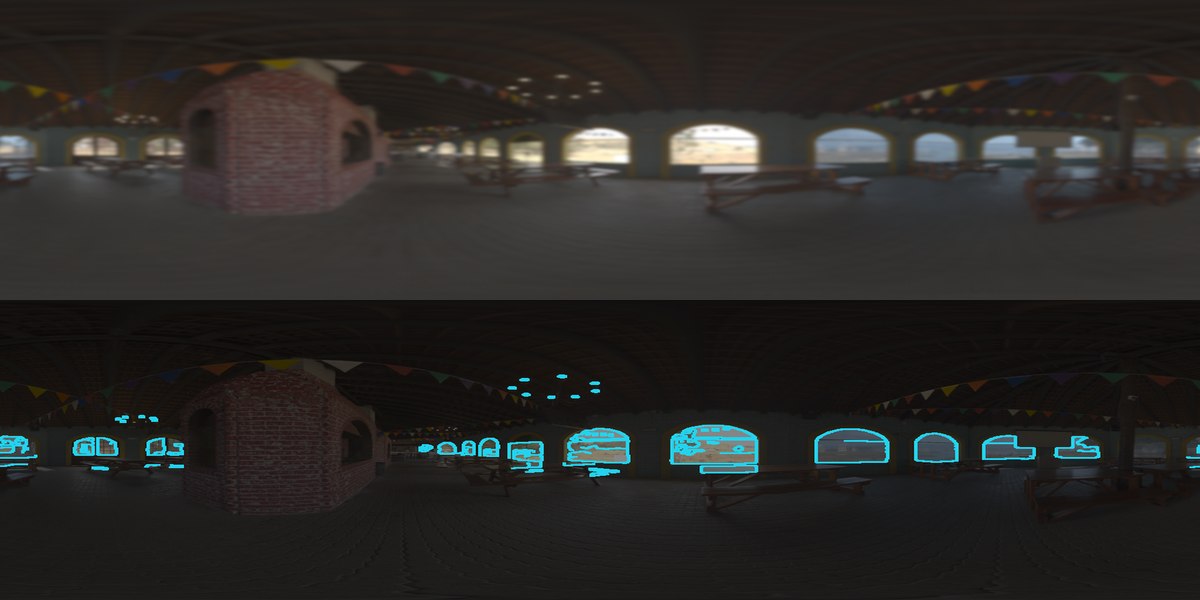
The application card uses the public CC0
Boma HDRI. It keeps one comparison legible at
README scale: constant-angle Gaussian smoothing above and geodesic Canny over
a dimmed source ERP below, both evaluated at 512×1024. The exact URL, authors,
checksum, parameters, and figure command are recorded in the downloadable
image provenance.
The Nature Reserve Forest figures later in this tutorial remain tracked regression/generalization fixtures produced by the older figure script.
1. Why a planar kernel is not spherical
In an ERP, longitude wraps at the left/right seam and the horizontal angular scale represented by a raster neighbourhood changes with latitude. Applying a planar kernel with ordinary image borders therefore creates a discontinuity at the seam and gives the poles a different angular footprint from the equator.
PanorAi places a kernel in the local east/down tangent frame of every output
ray. Each tap is carried to the unit sphere with the exponential map, then
sampled from the ERP with longitude wrapping. The default tap spacing is one
vertical ERP pixel, or 180 / H degrees.
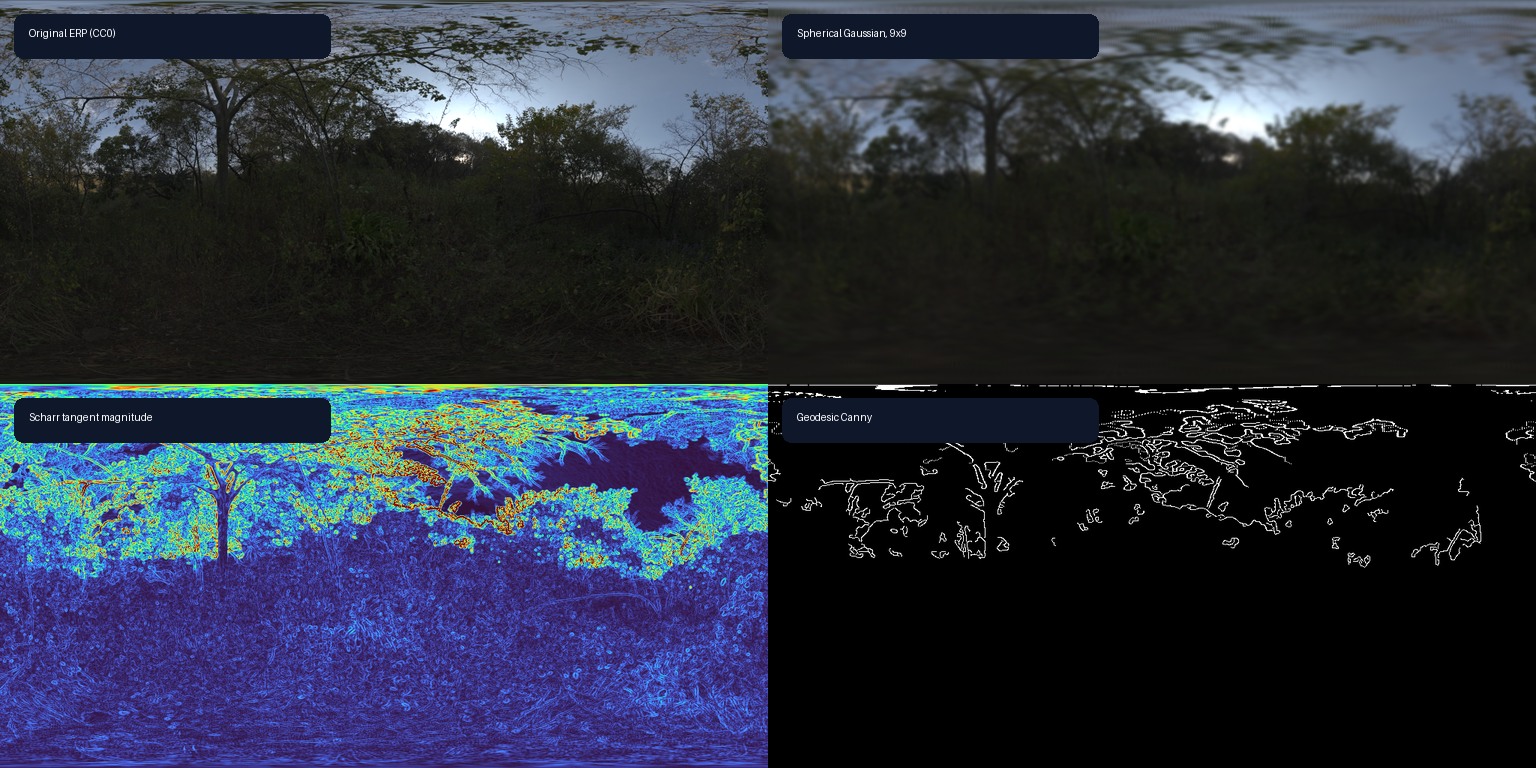
The Gaussian result above uses one angular kernel everywhere. The Scharr panel shows the magnitude of derivatives in the local east/north frame. Canny uses those directions for non-maximum suppression and uses spherical neighbours for hysteresis, including across the longitude seam.
Where each operation runs
The image-processing module does not materialize tangent images internally.
It evaluates tangent offsets directly on the sphere and samples the central
ERP. Gnomonic projection appears later in the feature pipeline, or explicitly
when an application chooses the separate process_views workflow.
The same classification, alongside projection, feature, geometry and SLAM
routes, is maintained in How PanorAi executes computer vision on spherical images.
Processing |
Computation route |
Spherical convolution? |
Gnomonic projection? |
What comes back |
|---|---|---|---|---|
custom |
local tangent taps → exponential map → direct ERP sampling |
yes; OpenCV-style correlation |
no |
filtered ERP |
box blur |
normalized box kernel through |
yes |
no |
smoothed ERP |
Gaussian blur |
Gaussian kernel through |
yes |
no |
smoothed ERP |
median blur |
geodesic tangent neighbourhood sampled directly from ERP |
no; nonlinear spherical neighbourhood |
no |
smoothed ERP |
bilateral filter |
geodesic spatial weights plus radiometric weights |
no; nonlinear spherical neighbourhood |
no |
edge-preserving ERP |
Sobel or Scharr |
east/north derivative kernels through |
yes |
no |
signed tangent derivatives |
Laplacian |
four-neighbour kernel through |
yes |
no |
signed second derivative |
Canny |
spherical Gaussian and gradients, then geodesic suppression and hysteresis |
partly; its linear stages use spherical convolution |
no |
binary ERP edge map |
histogram equalization |
direct ERP histogram weighted by latitude-band area |
no |
no |
equalized ERP |
SLIC superpixels |
Lab colour plus great-circle ray distance, solid-angle centroid updates, and seam-periodic connectivity |
no |
no |
integer ERP superpixel labels |
rotation |
inverse-map output rays through a 3×3 sphere rotation |
no |
no |
rotated ERP |
resize |
sample the exact output ERP rays |
no |
no |
resized ERP |
Gaussian pyramid |
spherical Gaussian followed by ray-based ERP resize |
yes, before each reduction |
no |
tuple of ERP levels |
Laplacian pyramid |
spherical Gaussian pyramid plus ray-resized residuals |
yes, in its Gaussian stages |
no |
tuple of ERP residual levels |
SIFT, ORB, or AKAZE features |
ERP → overlapping gnomonic views → planar OpenCV detector → panorama bearings |
preprocessing may use it; detector does not |
yes |
keypoints/descriptors mapped to ERP coordinates and unit bearings; no reconstructed image |
experimental spherical DoG + SIFT |
spherical Gaussian/DoG extrema → one tangent patch per accepted bearing → OpenCV SIFT descriptor |
yes, for the detector scale space |
only one local patch per descriptor; detection does not use projected views |
seam-aware keypoints, angular scales, 128-value SIFT descriptors, and unit bearings |
explicit |
ERP → chosen tangent/cubemap views → caller operation → back-project and blend |
no; the caller operation runs in the projected view domain |
yes |
reconstructed ERP plus support |
2. Run a complete processing chain
The executable example below creates a low-contrast ERP, equalizes it, applies a custom sharpening kernel and Gaussian smoothing, computes gradients and Canny edges, rotates the sphere, and constructs a scale pyramid.
from panorai.image_processing import (
    spherical_canny,
    spherical_equalize_histogram,
    spherical_filter2d,
    spherical_gaussian_blur,
    spherical_gaussian_pyramid,
    spherical_gradient,
    spherical_rotate,
)

process_height, process_width = 48, 96
py, px = np.indices((process_height, process_width))
low_contrast = (88 + 24 * (((px // 8) + (py // 8)) % 2)).astype(np.uint8)
equalized = spherical_equalize_histogram(low_contrast)
signal = equalized.astype(np.float32) / 255.0
sharpen_kernel = np.array([[0.0, -1.0, 0.0], [-1.0, 5.0, -1.0], [0.0, -1.0, 0.0]])
sharpened = spherical_filter2d(signal, sharpen_kernel)
smoothed = spherical_gaussian_blur(signal, ksize=5, sigma=1.2)
gradient = spherical_gradient(smoothed, operator="scharr")
edges = spherical_canny(signal, 0.04, 0.10, gaussian_ksize=3)
yaw = np.deg2rad(20.0)
rotation = np.array(
    [
        [np.cos(yaw), 0.0, np.sin(yaw)],
        [0.0, 1.0, 0.0],
        [-np.sin(yaw), 0.0, np.cos(yaw)],
    ]
)
rotated = spherical_rotate(signal, rotation)
pyramid = spherical_gaussian_pyramid(signal, levels=3)
assert sharpened.shape == smoothed.shape == rotated.shape == signal.shape
assert gradient.east.shape == gradient.north.shape == signal.shape
assert edges.dtype == np.uint8 and np.count_nonzero(edges) > 0
assert [level.shape for level in pyramid] == [(48, 96), (24, 48), (12, 24)]
spherical_filter2d follows OpenCV’s correlation convention: the supplied
kernel is not flipped. Compatible NumPy float32 and float64 HW/HWC arrays
use the first-party C++ implementation when available. Set backend="numpy"
for the reference path or backend="native" when native execution is a hard
requirement.
Use the operators according to the noise and structure in the data:
Operator |
Use it for |
Main caution |
|---|---|---|
box or Gaussian |
denoising before gradients or keypoints |
smooths real detail |
median |
isolated salt-and-pepper noise |
nonlinear and currently NumPy-only |
bilateral |
denoising while retaining intensity edges |
slower and parameter-sensitive |
custom |
sharpening or domain-specific linear kernels |
non-finite taps are not renormalized |
3. Equalize by spherical area
Near the poles, an ERP allocates many pixels to a small solid angle. A raw
pixel-count histogram therefore lets polar rows influence the mapping more
than the same surface area near the equator. Spherical equalization uses
weight[y] = cos(pi / 2 - pi * (y + 0.5) / H),
which is proportional to the exact solid angle of that latitude band.
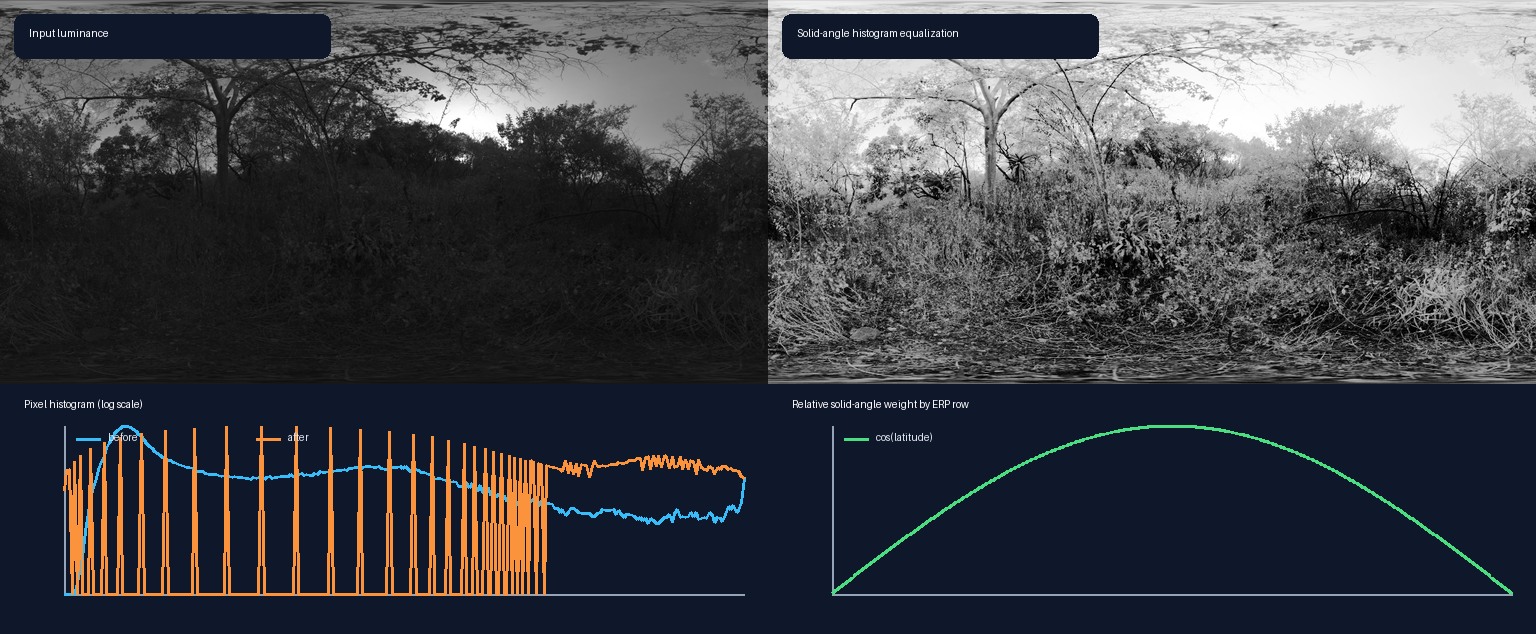
The aggressive contrast change in this example makes the mapping visible; it
does not imply that equalization always improves matching. Validate keypoint
repeatability and geometric inlier rate on the deployment domain. Use
area_weighted=False when exact ordinary cv2.equalizeHist behavior is
required, and use mask= to exclude invalid samples from construction of the
lookup table.
What about CLAHE?
PanorAi does not currently expose a first-party sphere-native CLAHE operator.
OpenCV CLAHE can be supplied as the planar callback in an explicit
process_views workflow, but that result depends on face layout, FOV, overlap,
and blending. It is therefore a projected-view preprocessing choice, not an
equivalent implementation of contextual equalization on the sphere.
A sphere-native design needs geodesic contextual regions that cross the ERP seam, stable behavior near the poles, and interpolation between local mappings without introducing tile boundaries. It must also be evaluated on downstream keypoint repeatability, match precision, and pose—not only visual contrast. Until that contract exists, the global solid-angle equalizer is the canonical first-party option and projected-view CLAHE must be recorded explicitly in the experiment configuration.
4. Use preprocessing before spherical keypoints
The Stable feature pipeline detects descriptors on gnomonic virtual cameras.
Preprocessing changes the central ERP first, then PanorAi projects the enhanced
signal and maps detections back to panorama-frame bearings. It does not make a
planar detector itself seam-aware. The Experimental
SphericalDoGSIFTPipeline described in Tutorial: spherical features and matching instead
builds its DoG scale space directly on the sphere.
from panorai.image_processing import spherical_equalize_histogram

enhanced_texture = spherical_equalize_histogram(texture)
enhanced_features = feature_pipeline.extract(
    enhanced_texture, panorama_id="equalized-frame"
)
assert enhanced_texture.dtype == np.uint8
assert len(enhanced_features) > 0
Keep the same preprocessing configuration for both images in a matching pair, record it with the feature-pipeline parameters, and compare against the unprocessed baseline. Histogram equalization can amplify sensor noise, while excessive smoothing can remove the corners the detector needs.
5. Transformations and scale space
spherical_rotate takes a proper 3×3 active rotation in PanorAi’s canonical
+X right, +Y up, +Z forward frame. Reverse mapping covers every output
pixel without an artificial border. spherical_resize samples the exact rays
of the new raster.
Gaussian pyramids smooth on the sphere before each reduction. Laplacian
pyramids retain the residual against the expanded coarser level and can be
reconstructed with reconstruct_laplacian_pyramid. This is the appropriate
starting point for future scale-aware spherical detectors; it is not yet a
claim of SIFT scale-space equivalence.
6. Continue the workflow
Continue to Tutorial: spherical features and matching for SIFT, ORB, AKAZE, and descriptor matching on spherical virtual cameras.
Compare direct spherical filtering with the complete project/filter/reconstruct route in Benchmarks and performance and reproduce the timing and yaw-equivariance probe with
scripts/benchmark_image_processing_routes.py.Use Spherical image processing for the compact API guide and current limitations.
Return to Projection foundations: sphere, rays, views, samplers, and blenders for the exact ERP ray convention.
Treat API stability in 3.x as the authoritative stability boundary.