Analyze regions on a sphere
Start from a boolean mask and keep support and validity explicit.
import numpy as np

from panorai.ops import spherical as S

mask = np.zeros((180, 360), dtype=bool)
mask[70:110, :20] = True
mask[70:110, -20:] = True  # the same seam-crossing region
support = np.ones_like(mask)
validity = np.ones_like(mask)

labels = S.connected_components(
    mask,
    support=support,
    validity=validity,
    connectivity=8,
)
measurements = S.measure_regions(
    labels,
    support=support,
    validity=validity,
)
assert labels.max() == 1
print(measurements.regions[0].solid_angle_sr)
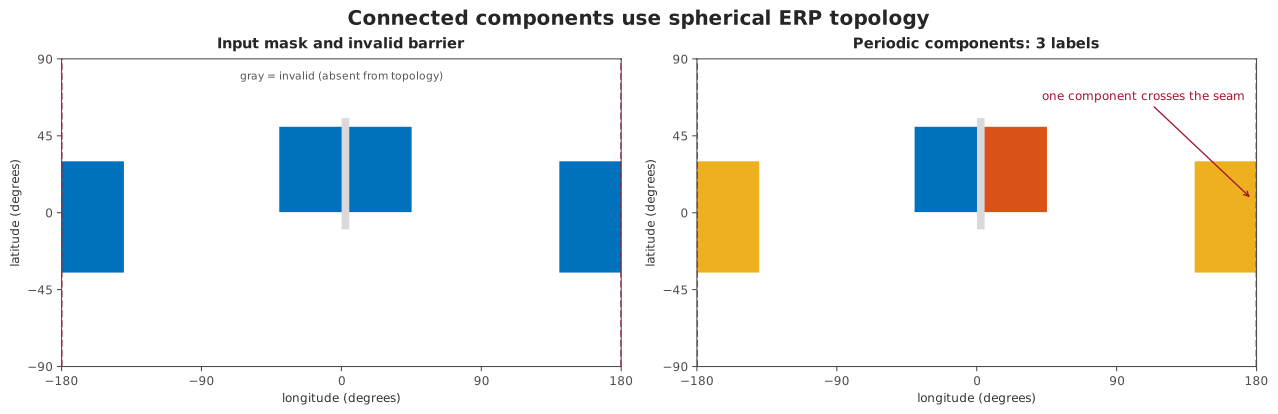
The first practical check is the seam: samples at the left and right image edges can belong to the same spherical component.
Run the same path on a real panorama
Use the spherical container for file loading and resizing. The threshold below is intentionally described as a bright-region candidate: it makes windows, doorways and lamps easy to inspect. It is not a trained classifier or ground truth.
import numpy as np

from panorai import EquirectangularImage
from panorai.ops import spherical as S

panorama = EquirectangularImage.open("poly-haven-studio-erp.jpg")
panorama = panorama.resize((360, 180))
rgb = np.asarray(panorama.data, dtype=np.float64) / 255.0
luminance = 0.2126 * rgb[..., 0] + 0.7152 * rgb[..., 1] + 0.0722 * rgb[..., 2]
smoothed = S.gaussian_blur(luminance, ksize=7, sigma=1.5)
candidate = smoothed >= np.quantile(smoothed, 0.90)

labels = S.connected_components(candidate, connectivity=8)
regions = S.measure_regions(labels)
largest = max(regions.regions, key=lambda region: region.solid_angle_sr)
distance_deg = S.geodesic_distance_transform(
    labels == largest.label,
    units="degrees",
)
The repository’s real-image regression also rolls the ERP by 37 columns and checks that components retain the same solid angles, distance and hole filling roll exactly, and watershed, boundaries, measurements and adjacency remain equivariant.
The real-image figures are executable API maps, not decorative screenshots:
the box names the public operation and its input/output types, the numbered
panels show the values, and USE identifies the downstream task. The source
photograph is brightened only for display; the computation uses the decoded
source values.
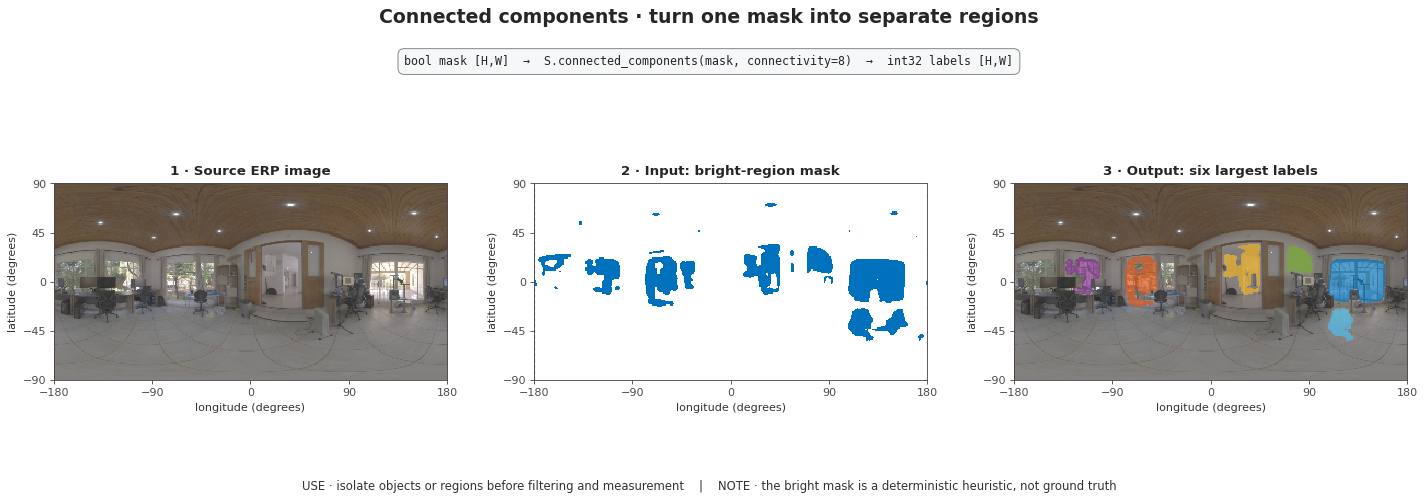
The real office image makes the bright windows, doorways and lamps easy to match to their labels while retaining texture, shadows and a real ERP seam.
The same operation can be inspected and persisted in a Pipeline.
from panorai import EquirectangularImage
from panorai.data import RasterFieldSpec
from panorai.pipeline import AnalyzeRegions, OnSphere, Pipeline

panorama = EquirectangularImage.from_field(
    "mask",
    mask,
    spec=RasterFieldSpec.categorical(),
    support=support,
    valid=validity,
)
pipeline = Pipeline(
    OnSphere(S.ConnectedComponents(8), input="mask", output="labels"),
    AnalyzeRegions(),
)
region_evidence = pipeline(panorama)
For multi-field marker-controlled segmentation, attach a floating features
gradient and integer labels markers to one EquirectangularImage, then
run SphericalWatershed. AnalyzeRegions consumes a label-bearing
container and returns measurements, a region adjacency graph and optional
boundary samples.
from panorai.pipeline import AnalyzeRegions, SphericalWatershed

partition = Pipeline(SphericalWatershed())(panorama_with_gradient_and_markers)
evidence = Pipeline(AnalyzeRegions())(panorama_with_partition_labels)
Request ordered contours when a downstream consumer needs a traversal rather than an unordered set of boundary samples:
evidence = Pipeline(AnalyzeRegions(include_contours=True))(
    panorama_with_partition_labels
)
first_loop = evidence.contours.contours[0]
assert first_loop.bearings_xyz.shape[1] == 3
Use the medial axis to reduce a region to its intrinsic spherical centreline:
centreline = S.skeletonize(
    candidate,
    support=support,
    validity=validity,
    minimum_radius_deg=0.5,
)
trace_contours leaves contours open at missing support by default. Pass
include_support_boundary=True only when the domain edge itself should be
reported as observed boundary.
Use geodesic_distance_transform(mask, units="degrees") when an angular
distance is the desired result. Use fill_holes only with a justified
solid-angle threshold; there is no canonical exterior on a closed sphere.
Choose the output that matches the next step
Keep
labelswhen another raster operation or Pipeline Stage follows.Use
region_boundariesfor a typed boundary mask.Use
extract_boundarieswhen downstream geometry needs unit bearings.Use
trace_contoursfor ordered sub-pixel cell-edge bearings.Use
skeletonizefor a sampled intrinsic medial axis.Use
measure_regionsfor physical region measurements.Use
region_adjacency_graphfor graph reasoning and merging policies.
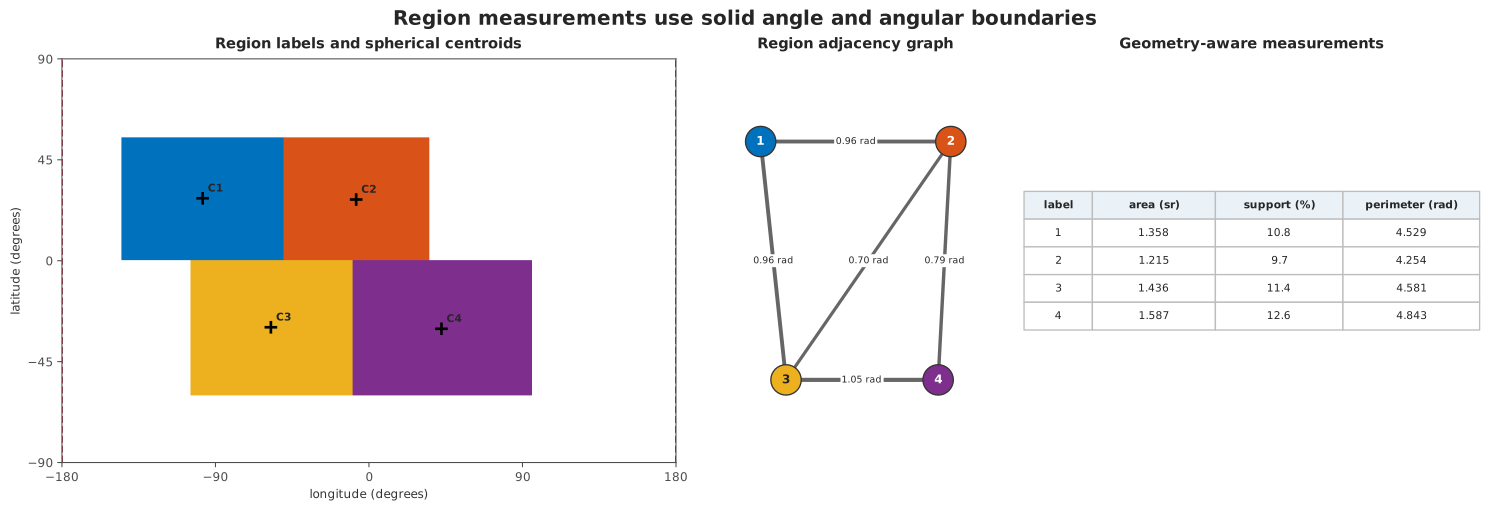
One label field can feed raster processing, geometric lifting, tabular measurements and a region adjacency graph without changing coordinate conventions.
See the concept for exact topology and measurement semantics and the operations reference for the public members.