Pipeline: compose the method
Choose Pipeline when the task needs a different sequence, execution domain or
result topology. A Pipeline is an inspectable sequence of public Stage
objects and is itself a Stage, so compositions can be nested.
Surface |
Stability |
Canonical import |
Contract |
Public components or entries |
|---|---|---|---|---|
spherical-region-analysis-pipeline |
Stable |
panorai.pipeline |
panorai-spherical-region-analysis/v1 |
AnalyzeRegions, SphericalWatershed |
spherical-model-workflow |
Experimental |
panorai.workflow |
panorai-spherical-model-workflow/v1 |
SPHERICAL_MODEL_WORKFLOW_INTERFACE, AggregatedViewEvidence, EquirectangularImage, FacePointBatch, FaceRegionBatch, FaceViewOutput, GnomonicFace, GnomonicFaceSet, ObservationFusionResult, RasterFieldResult, RasterFieldSpec, SphericalBinaryMask, SphericalInputSpec, SphericalOutputSpec, SphericalOutputTree, SphericalPointObservation, SphericalPointSet, SphericalRegionObservation, SphericalRegionSet, SphericalViewObservation, SphericalViewSet |
panorama-stitching-stages |
Experimental |
panorai.stitching |
panorai-panorama-stitching/v1-experimental |
BlendStitchingPanorama, CalibrateAndRegister, CompensateExposure, DetectStitchingFeatures, DiscoverOverlaps, StitchingRegistrationError, WarpRegisteredImages |
spherical-pipeline-core |
Stable |
panorai.pipeline |
panorai-spherical-pipeline/v1 |
AggregateViews, Attach, ClassificationResult, EmbeddingResult, LiftToBearings, OnSphere, Output, Parallel, PerView, PerViewResults, Pipeline, PipelineCacheError, PipelineRun, PipelineSerializationError, RasterField, RasterGrid, ReconstructERP, ResultBundle, SampleViews, Select, SphericalObservations, StageRecord, Stage, StageResult, ViewObservations, ViewResult, registered_pipeline_components, register_torch_module, registered_torch_modules |
spherical-pipeline-semantic-instances |
Experimental |
panorai.pipeline |
panorai-spherical-instance-pipeline/v1-experimental |
CAMEvidenceFrame, CAMGuidedSphericalInstances, CAMRegionProposal, CAMRegionProposalSet, CAMRegionProposals, SAMMaskProposalBatch, SAMMaskRefinement, SphericalCAM, SphericalInstanceFusion |
spherical-pipeline-root-convenience |
Stable |
panorai.pipeline |
panorai-spherical-pipeline/v1 |
Pipeline, PipelineRun, Stage, StageResult, RasterField, ResultBundle, ClassificationResult, EmbeddingResult, SphericalObservations, OnSphere, Output, Parallel, SampleViews, PerView, ReconstructERP, Select, Attach, LiftToBearings, AggregateViews |
spherical-pipeline-auto-experimental |
Experimental |
panorai.pipeline |
panorai-spherical-pipeline/auto-experimental |
— |
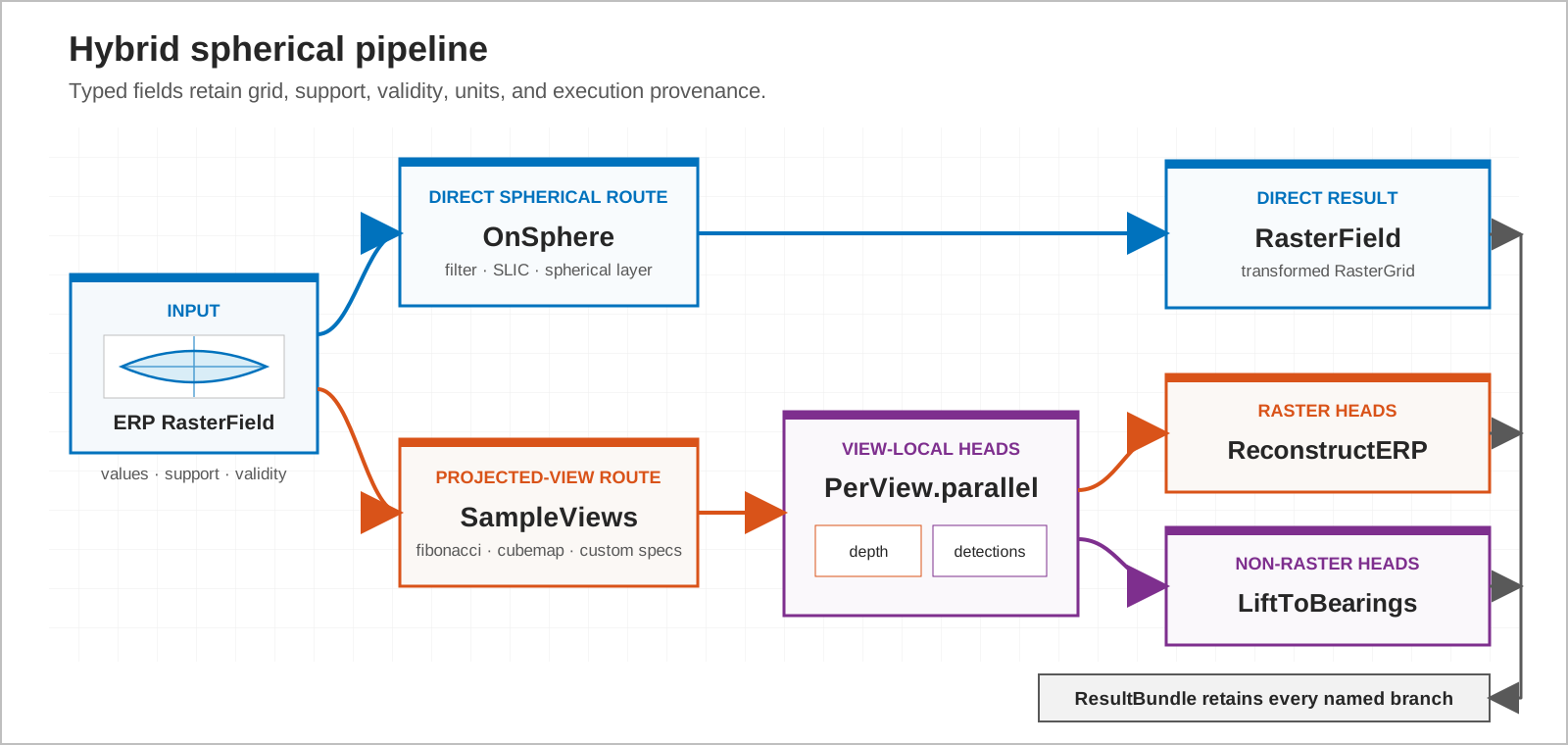
1. Execute directly on the sphere
OnSphere applies a declared sphere-aware operation to an ERP. No tangent
faces or fusion step are created.
2. Process projected views
SampleViews creates canonical gnomonic views, PerView applies ordinary
view-local callables, and ReconstructERP fuses raster outputs. The same
Pipeline can retain non-raster branches such as detections.
The executable example below demonstrates both routes and ends with a mixed
ResultBundle:
import numpy as np
from panorai.ops.spherical import GaussianBlur
from panorai.pipeline import (
    OnSphere,
    Output,
    PerView,
    Pipeline,
    ReconstructERP,
    ResultBundle,
    SampleViews,
)

rgb = panorama.image

direct = Pipeline(OnSphere(GaussianBlur(ksize=3, sigma=0.8, backend="numpy")))(
    panorama
)
assert direct.image.shape == rgb.shape

def label_view(view: np.ndarray) -> np.ndarray:
    return (view[..., 0] > 0.5).astype(np.int16)

def detect_view(view: np.ndarray) -> dict[str, np.ndarray]:
    return {"scores": np.asarray([float(view.mean())], dtype=np.float32)}

mixed = Pipeline(
    SampleViews("cube", size=8),
    PerView.parallel(
        labels=Output(label_view, kind="labels"),
        detections=Output(detect_view, kind="detections"),
    ),
    ReconstructERP(labels="closest"),
)(panorama)

assert isinstance(mixed, ResultBundle)
assert mixed["erp"].labels.shape == rgb.shape[:2]
assert len(mixed["detections"]) == 6
3. Add semantics before routing
Output declares whether a callable returns labels, radial-range depth,
detections, classification or another supported family. Raster branches carry
RasterGrid; view observations retain face identity, projection, support
and validity. Select, Attach and Parallel route these named values
without guessing their meaning.
Labels and masks therefore reconstruct with nearest sampling. Depth requires units and may opt into mathematically defined validity renormalization. A generic callable never silently changes either rule.
4. Choose batching deliberately
batch=None executes one view at a time. A positive integer fixes a
deterministic chunk size. batch="auto" is accepted only for callables that
declare batch support and uses a bounded element budget. PanorAi never retries
silently after out-of-memory failure.
5. Inspect, retain and persist
Use pipeline.run(value, retain=(...)) for a PipelineRun containing
output, selected intermediates and stage records. describe() exposes the
topology. to_config() is available only when every component is registered;
cache identity includes values, masks, grids, configuration and registered
weight identity.
Read Typed pipeline composition for the data model and Pipeline API for exact signatures. The larger composed API guide covers persistence, cache and the Experimental CAM/SAM stages.