Tutorial: dense stereo from two spherical images
Field |
Contract |
|---|---|
Application |
Estimate radial range |
Input |
Two ERPs and a known metric relative pose |
Output |
Radial range, validity, confidence, and diagnostics |
Strategy |
Sphere-native epipolar search |
API |
|
Stability |
Experimental |
Dependencies |
Core NumPy/SciPy stack |
Evidence |
Analytic fixture with exact reference range |
How this application is composed
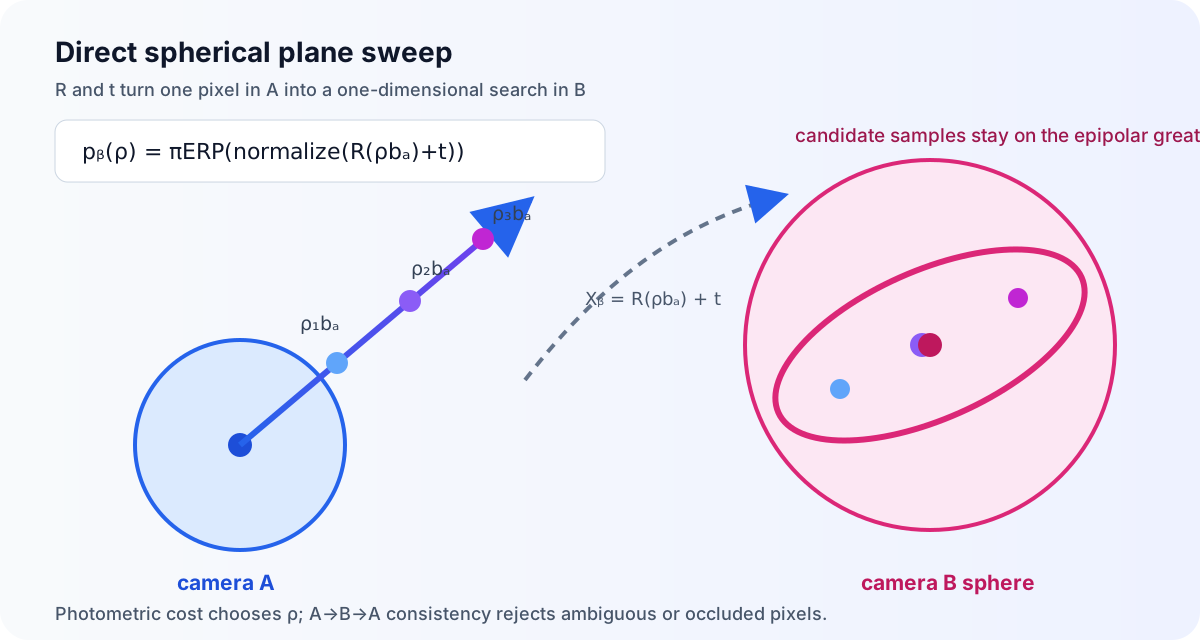
The method builds ERP rays with panorai.geometry, transports inverse-range
hypotheses through the supplied pose, samples the target ERP periodically, and
reduces matching costs into radial range, validity and confidence fields.
estimate_spherical_range() is the wrapper for this complete solver; the
individual operations remain explicit in the derivation rather than exposed as
an unsafe half-configured pipeline.
panorai.stereo estimates a radial-range map from two central
equirectangular panoramas (ERPs) when their relative pose is already known.
The API is Experimental: it is suitable for controlled evaluation and
research integration, but real-scene accuracy and coverage are not yet part of
PanorAi’s Stable contract.
This tutorial assumes that you already have
two central ERPs with the same
(height, width);a rotation $R_{BA}$ and translation $\mathbf t_{BA}$ satisfying $\mathbf X_B=R_{BA}\mathbf X_A+\mathbf t_{BA}$;
a useful near/far range interval for the scene; and
metric translation if the output must be expressed in metres.
If your pose contains only a unit translation direction, read the two-view tutorial before continuing. The detailed objective and derivation are in Direct spherical dense stereo: geometry and optimization.
1. Check the pose convention
PanorAi maps a point from camera A to camera B with
$$ \mathbf X_B=R_{BA}\mathbf X_A+\mathbf t_{BA}. $$
The center of camera B, expressed in camera A, is therefore
$$ \mathbf C_B^{(A)}=-R_{BA}^{T}\mathbf t_{BA}. $$
This sign is easy to reverse accidentally. For example, when camera B is 0.35 m to the right of A and the cameras have equal orientation, $\mathbf C_B^{(A)}=[0.35,0,0]^T$ but $\mathbf t_{BA}=[-0.35,0,0]^T$.
The magnitude of $\mathbf t_{BA}$ fixes the output scale:
Translation supplied to the estimator |
Meaning of |
|---|---|
metres |
radial range in metres |
centimetres |
radial range in centimetres |
unit translation direction |
range in arbitrary baseline units |
Dense stereo cannot recover the missing baseline magnitude from two central images alone. Known tripod height helps only when it produces an observable metric constraint, as described in the two-view tutorial.
2. Load same-shape central ERPs
uint8 RGB and grayscale images are accepted directly. Floating inputs must
be finite and in $[0,1]$.
import numpy as np
from PIL import Image

erp_a = np.asarray(Image.open("erp-a.png").convert("RGB"))
erp_b = np.asarray(Image.open("erp-b.png").convert("RGB"))

if erp_a.shape != erp_b.shape:
    raise ValueError("dense stereo requires equal ERP shapes")

# Replace these values with the pose from your calibrated pipeline.
R_b_from_a = np.eye(3, dtype=np.float64)
t_b_from_a_m = np.array([-0.35, 0.0, 0.05], dtype=np.float64)
Both images must use PanorAi’s canonical central-camera frame. Resizing, cropping, changing the longitude origin, or levelling only one ERP invalidates the supplied pose unless the corresponding geometric transformation is also applied to the camera model.
3. Choose the search interval before thresholds
The estimator samples uniformly in inverse range. Start by choosing the narrowest interval that still contains the expected surfaces:
from panorai.stereo import SphericalStereoOptions

options = SphericalStereoOptions(
    min_range=0.5,
    max_range=15.0,
    num_hypotheses=128,
    window_size=7,
    bidirectional_consistency=True,
    filter_backend="auto",
    pyramid_levels=3,
    refinement_hypotheses=9,
    refinement_radius_steps=4.0,
)
The matching window is angular: local means, variances, east/north gradients,
and cost aggregation are evaluated in each ERP ray’s tangent plane. auto
uses PanorAi’s C++ spherical-convolution kernel for compatible NumPy arrays and
falls back to the NumPy reference. Use native to require C++ or numpy
for explicit reference validation. This stage does not project to gnomonic
images and back.
For $D$ hypotheses, the inverse-range step is
$$ \Delta q = \frac{1/\rho_{\min}-1/\rho_{\max}}{D-1}, \qquad q=\frac{1}{\rho}. $$
The approximate radial spacing around range $\rho$ is
$\Delta\rho\approx\rho^2\Delta q$. Increasing max_range without increasing
num_hypotheses therefore makes distant geometry increasingly coarse.
pyramid_levels=1 runs that full global lattice at the input resolution.
Values above one enable PanorAi’s adaptive coarse-to-fine search. For an
8192x4096 ERP, pyramid_levels=3 runs the broad num_hypotheses sweep at
2048x1024, then refines a local inverse-range interval with
refinement_hypotheses labels at 4096x2048 and 8192x4096. Low-confidence and
boundary regions receive wider intervals; every local interval is shifted
inside the global near/far bounds so clipped duplicate labels cannot create a
false optimum.
This pyramid changes only the dense range search. The supplied $R,t$ is never re-estimated or downsampled. If pose comes from PanorAi feature matching, run that pipeline at the resolution and gnomonic face size required by the scene, then pass its high-resolution pose to dense stereo.
Do not begin by weakening confidence or consistency thresholds. First verify pose convention and scale, then the search interval, then image alignment and photometric compatibility.
4. Estimate radial range
from panorai.stereo import estimate_spherical_range

result = estimate_spherical_range(
    erp_a,
    erp_b,
    R_b_from_a,
    t_b_from_a_m,
    options=options,
)

range_m = result.range
valid = result.validity_mask

print(result.describe())
print(f"accepted coverage: {valid.mean():.1%}")
The same public contract is exercised by the installed-documentation smoke runner:
from panorai.stereo import SphericalStereoOptions, estimate_spherical_range

# Dense stereo starts after R and metric t have already been obtained.
stereo_options = SphericalStereoOptions(
    min_range=0.5,
    max_range=4.0,
    num_hypotheses=8,
    window_size=3,
    pole_margin_fraction=0.0,
    min_texture_std=0.0,
    min_confidence=0.0,
    max_matching_cost=1.0,
    bidirectional_consistency=False,
)
stereo_result = estimate_spherical_range(
    rgb,
    np.roll(rgb, 1, axis=1),
    np.eye(3),
    np.array([-0.25, 0.0, 0.0]),  # X_b = R_ba @ X_a + t_ba; metres here
    options=stereo_options,
)
assert stereo_result.range.shape == rgb.shape[:2]
assert stereo_result.validity_mask.dtype == np.bool_
assert stereo_result.quantity == "radial_range"
The output quantity is radial range, not pinhole Z-depth:
$$ \mathbf X_A(p)=\rho(p),\mathbf b_A(p). $$
result.range contains NaN at rejected pixels. Always transport
result.validity_mask with it instead of filling holes silently.
5. Inspect the result before using it
from panorai.stereo import (
    colorize_spherical_range,
    render_spherical_stereo_result,
)

range_rgb = colorize_spherical_range(range_m, valid)
Image.fromarray(range_rgb).save("radial-range.png")

diagnostic_rgb = render_spherical_stereo_result(
    erp_a,
    result,
    target_erp=erp_b,
    # reference_range=reference_range_m,  # optional ground truth
)
Image.fromarray(diagnostic_rgb).save("stereo-diagnostic.png")
The helpers return RGB uint8 arrays and do not modify the numeric result.
Confidence is the normalized separation between the best and second-best
costs. It is useful for ranking ambiguity, but it is not a calibrated
probability.
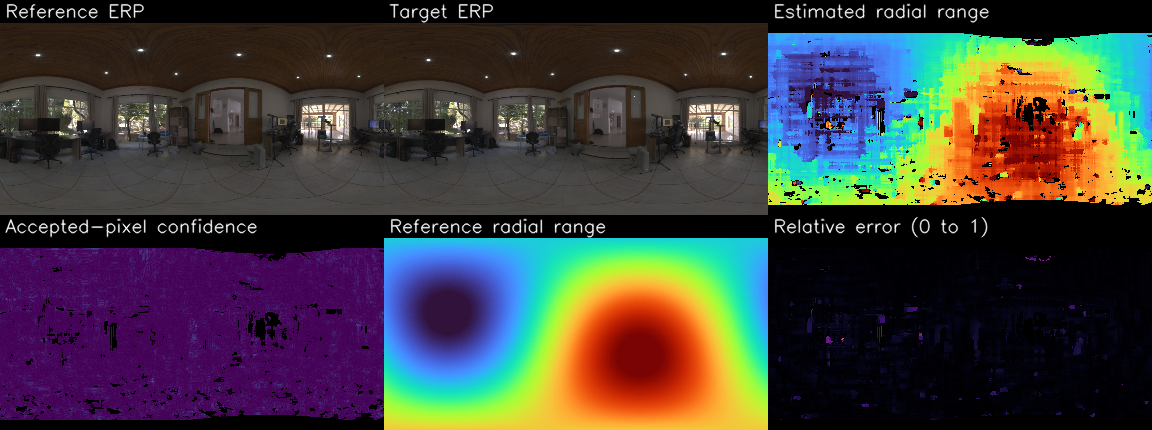
The figure below uses a real CC0 Poly Haven panorama as scene texture. The second camera and reference range are rendered from analytic geometry so the visual comparison has exact ground truth without redistributing an evaluation dataset.
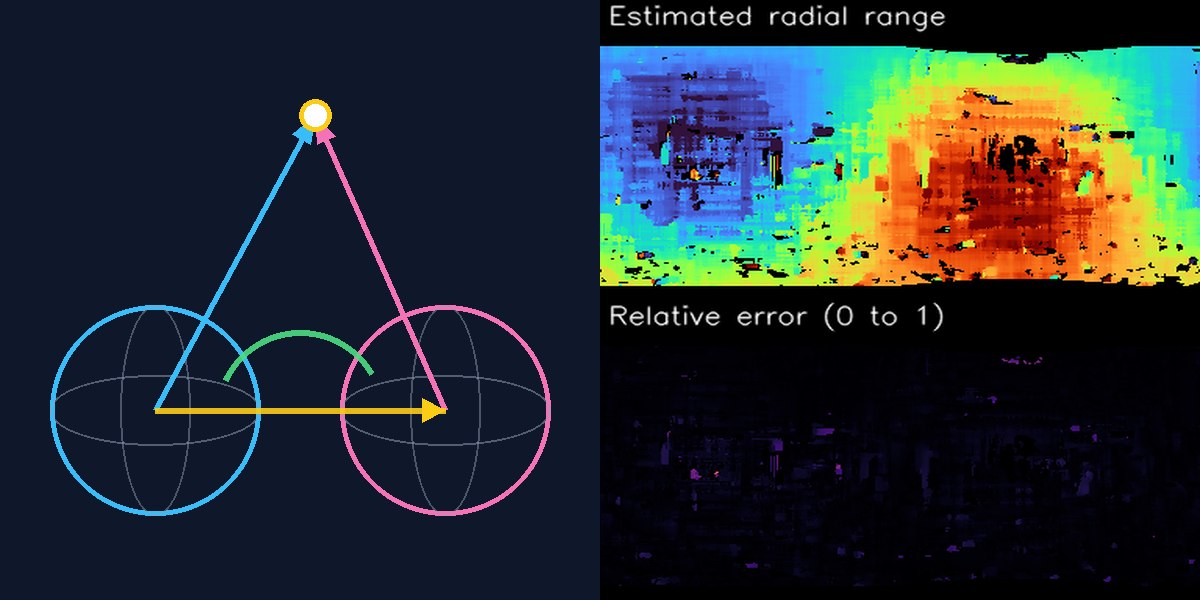
The left panel is a method diagram: two registered spherical cameras, bearing rays, relative rotation, translation direction, and a shared 3D point. The right panels are analytic-fixture outputs from the result below. Keeping those evidence types side by side explains the geometry without presenting the diagram as a measured reconstruction.
6. Convert accepted range to 3D points
from panorai.geometry import erp_pixels_to_rays

height, width = range_m.shape
y, x = np.indices((height, width), dtype=np.float32)
pixels_xy = np.stack((x, y), axis=-1)
rays_a = erp_pixels_to_rays(pixels_xy, (height, width))

points_a_m = rays_a[valid] * range_m[valid, None]
The points are expressed in camera A’s frame. Transform them to B with the same $R_{BA},\mathbf t_{BA}$ supplied to stereo, or into a world frame using the pose convention of your reconstruction.
7. Understand every result field
Field |
Shape/type |
Meaning |
|---|---|---|
|
|
refined radial range; invalid entries are |
|
|
pixels accepted by all enabled checks |
|
|
best-versus-second-best cost separation |
|
|
winning aggregated appearance cost |
|
|
winning inverse-range lattice index |
|
|
increasing $1/\rho$ lattice |
|
string |
absolute global lattice or normalized local offsets |
|
optional |
adaptive per-pixel interval center |
|
optional |
adaptive per-pixel interval half-width |
Result arrays are read-only. This prevents a visualization or post-processing step from silently changing the evidence associated with the result.
8. Tune in a controlled order
Pose and frame: verify $R,t$, their direction, translation sign, and longitude convention using a few known 3D points.
Metric scale: confirm the baseline independently. A unit translation produces baseline units, not metres.
Range bounds: inspect how many winners land on the first or last hypothesis. Boundary winners are rejected because the true surface may lie outside the interval.
Hypothesis density: increase
num_hypothesesor narrow the interval before relaxing validity.Adaptive schedule: for large ERPs, compare
pyramid_levels=3with the globalpyramid_levels=1baseline. More levels are faster but propagate a weaker coarse prior; increaserefinement_radius_stepswhen winners often hit a local boundary.Angular appearance window: increase
window_sizefor weak texture, but expect more bleeding across depth boundaries. The support remains angularly consistent at every latitude.Acceptance: adjust
min_texture_std,min_confidence, andmax_matching_costonly while reporting accuracy and coverage together.Consistency: tune absolute tolerance in the translation unit and relative tolerance as a range fraction.
Runtime and peak memory are proportional to $DHW$. Bidirectional consistency runs the one-way estimator twice. Adaptive mode replaces the full-resolution $D$ volume with one coarse $D$ volume plus smaller local-refinement volumes; the final result is still evaluated at the input ERP resolution.
9. Diagnose common failure modes
Symptom |
Likely cause |
First check |
|---|---|---|
depth has the right shape but wrong scale |
unit translation direction was used |
baseline magnitude and unit |
almost all pixels choose near/far bound |
interval or translation sign is wrong |
pose convention and range bounds |
repeated pipes produce confident false surfaces |
ambiguous local appearance |
confidence, Census/ZNCC experiment, multiscale evidence |
textureless walls disappear |
no discriminative photometric evidence |
texture threshold; do not invent depth |
poles are unstable |
ERP oversampling and compressed longitude |
pole margin |
seam becomes a vertical hole |
upstream resampling did not wrap longitude |
canonical ERP generation |
moving objects split or vanish |
static-scene assumption is violated |
mask dynamics before stereo |
consistency leaves very little coverage |
occlusion, ambiguity, or pose error |
compare one-way and bidirectional results |
10. Current real-scene evidence
In the study metrics, coverage divides accepted depth pixels by eligible
scanner-reference pixels (finite, inside the search interval, and outside the
pole margin). valid_fraction_of_full_erp divides by every ERP pixel. The
denominator must be named when comparing runs.
The original ten-pair Matterport360/Stanford2D3D development set gave pixel-weighted AbsRel 0.180 with the reference baseline magnitude. That set was post-hoc and is not a promotion-quality claim.
Promotion-quality evaluation must use preregistered, spatially disjoint Matterport3D buildings and Stanford2D3D areas. Report accuracy and accepted coverage together, and do not use a frozen test split to select thresholds.
The next accuracy experiments are Census/ZNCC or learned descriptors, explicit occlusion reasoning, and calibration of adaptive confidence. Read the method article for the exact objective, refinement, rejection policy, complexity, and promotion gates.