Projection foundations: sphere, rays, views, samplers, and blenders
Field |
Contract |
|---|---|
Application |
Project and reconstruct panoramic views |
Input |
ERP pixels, rays, or projected faces |
Output |
Views, bearings, support, and reconstructed ERP |
Strategy |
Projection-domain with sphere-native ray planning |
API |
|
Stability |
Stable geometry; Compatibility samplers |
Dependencies |
Core |
Evidence |
Real CC0 output plus analytic geometry checks |
How this application is composed
This is the geometric base used by the rest of PanorAi: pixel-centre
ERP↔bearing conversion, immutable projectors, samplers, explicit support and
mask-aware blenders. EquirectangularImage.views() packages those primitives
as reusable faces, while process_views() additionally wraps the local
operation and final reconstruction.
This tutorial builds the mental model behind every PanorAi projection. It uses
the Stable panorai.geometry contract first, then shows how compatibility
samplers and Stable blenders compose multiple virtual views.
See the Projection theme in the complete How PanorAi executes computer vision on spherical images for what projection enables and how analytic ray conversion, projected rasters, inverse projection, and blending divide between sphere-native and projection-domain work.
PanorAi-specific: one coordinate and pixel-centre contract for ERP, gnomonic and cubemap rays; view-centre sampling; inverse projection; and mask-authoritative fusion of overlapping backprojections.
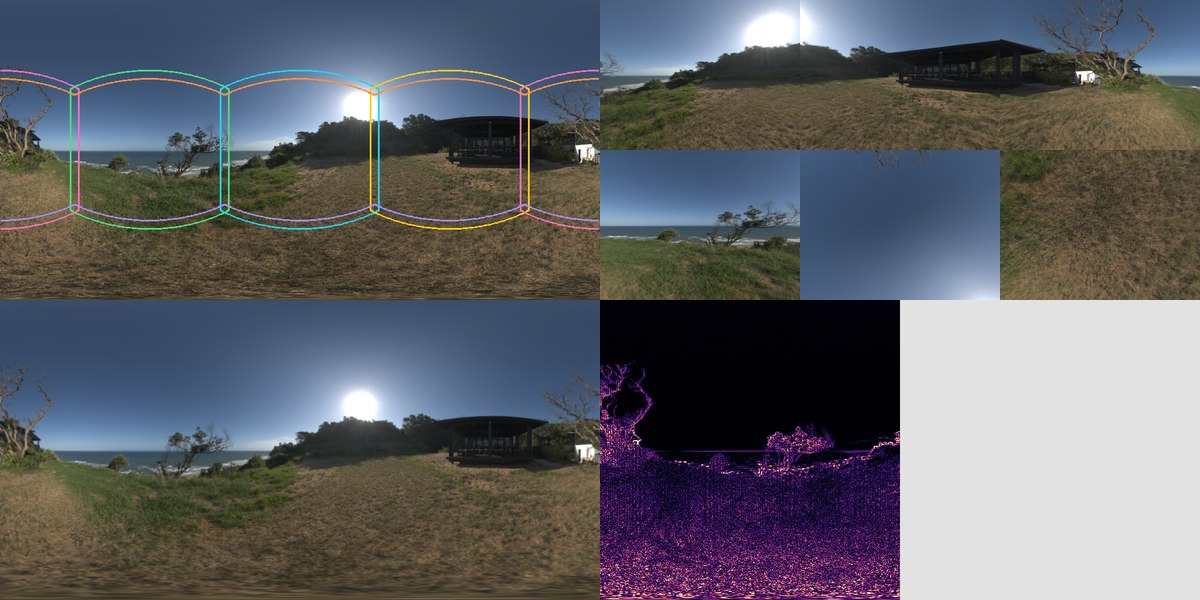
The application card uses the public CC0
Sundowner Overlook HDRI. From
top-left to bottom-right it shows the exact cube-face footprints, six projected
faces, the reconstructed ERP, and a split audit panel containing round-trip
error and explicit support. Its 512×1024 working resolution, source checksum,
and reproducible command are recorded in the downloadable
image provenance.
The older forest asset remains a separate regression/generalization fixture; it is not the visual identity of this application.
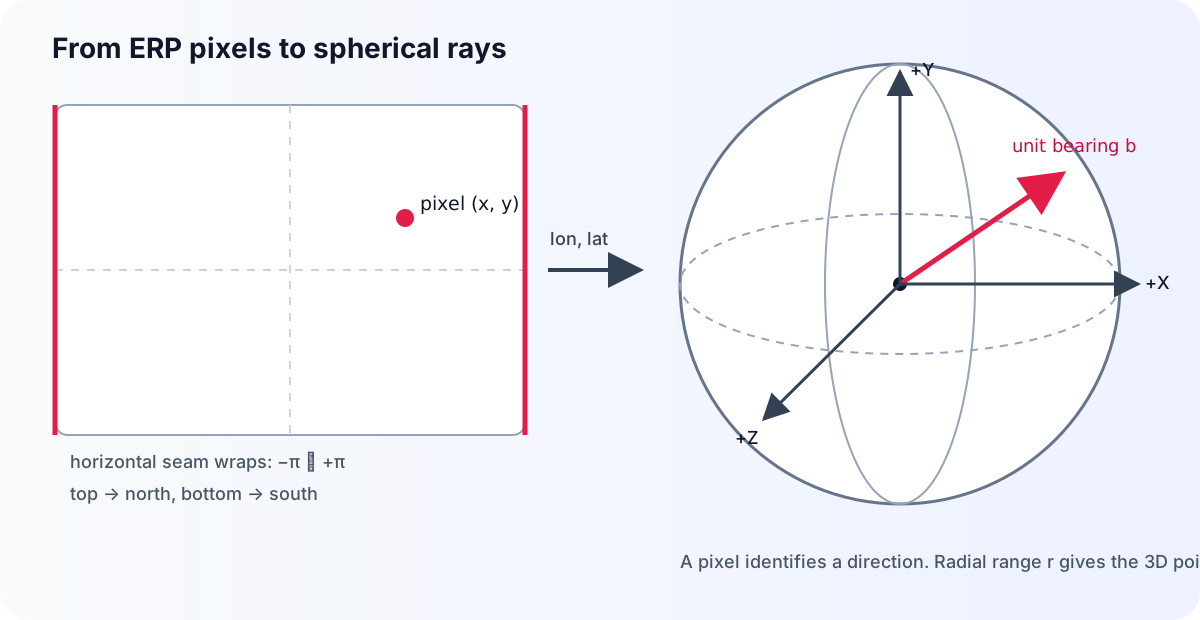
1. A panorama pixel represents a ray
PanorAi uses a right-handed panorama frame: +X right, +Y up, and +Z
forward. Image coordinates start at the top-left and address pixel centers.
For a panorama of width $W$ and height $H$, pixel $(x,y)$ becomes
$$ \lambda = 2\pi\frac{x+0.5}{W}-\pi, \qquad \phi = \frac{\pi}{2}-\pi\frac{y+0.5}{H}, $$
$$ \mathbf b = \begin{bmatrix} \sin\lambda\cos\phi & \sin\phi & \cos\lambda\cos\phi \end{bmatrix}^{T}. $$
The unit vector $\mathbf b$ is a bearing. A radial range $r$ gives a 3D point $\mathbf X=r\mathbf b$. It is not camera z-depth.
import numpy as np
from panorai.geometry import erp_pixels_to_rays, rays_to_erp_pixels

shape_hw = (512, 1024)
pixels_xy = np.array([[511.5, 255.5], [767.5, 255.5]])
rays = erp_pixels_to_rays(pixels_xy, shape_hw)
round_trip = rays_to_erp_pixels(rays, shape_hw)

np.testing.assert_allclose(np.linalg.norm(rays, axis=1), 1.0, atol=1e-12)
np.testing.assert_allclose(round_trip.pixels_xy, pixels_xy, atol=1e-12)
Longitude wraps at the left/right seam. The poles lie on raster boundaries, not at pixel centers; an exact pole has no unique longitude, so PanorAi returns a deterministic representative. See PanorAi canonical spherical geometry for all seam, pole, rounding, and cubemap tie rules.
The low-level functional projection remains available when no container is needed:
from panorai.geometry import GnomonicSpec, equirectangular_to_gnomonic

height, width = 16, 32
rgb = np.linspace(0.0, 1.0, height * width * 3, dtype=np.float32)
rgb = rgb.reshape(height, width, 3)  # HWC, float RGB in [0, 1]
view_spec = GnomonicSpec(
    center_lat_deg=15.0,
    center_lon_deg=30.0,
    hfov_deg=90.0,
    vfov_deg=60.0,
    output_shape_hw=(8, 12),
)
view = equirectangular_to_gnomonic(rgb, view_spec, interpolation="bilinear")
assert view.data.shape == (8, 12, 3)
assert view.data.dtype == np.float32
assert view.support_mask.shape == (8, 12)
2. Choose the surface that matches the task
Surface |
What it preserves |
Typical use |
|---|---|---|
ERP |
the complete sphere in one periodic raster |
storage, global context, spherical inference |
gnomonic |
straight rays through one tangent plane |
local feature detection, pinhole models, view-based networks |
cubemap |
six fixed 90° perspective faces |
rendering, fixed six-view inference, fast reconstruction |
arbitrary-N face set |
configurable overlapping tangent views |
uniform feature coverage and model ensembling |
A gnomonic view is a virtual pinhole camera. hfov_deg and vfov_deg are
full boundary-to-boundary angles; roll_deg rotates the virtual camera
clockwise as seen by an observer looking along the viewing direction.
from panorai.geometry import GnomonicProjector

projector = GnomonicProjector(view_spec, interpolation="bilinear")
projected = projector.project(rgb)
restored = projector.back_project(projected, (height, width))
assert projected.data.shape == (8, 12, 3)
assert restored.data.shape == rgb.shape
assert restored.support_mask.any()  # support is geometry, never ``data != 0``
The projector is reusable: its private, bounded plan cache is not part of equality, hashing, or public state. NumPy and Torch take the same public route; native C++ may accelerate compatible NumPy operations without changing the result contract.
The ERP container delegates to the same projection engine while preserving the source modalities and support:
from panorai.data import EquirectangularImage

panorama = EquirectangularImage(rgb)
face = panorama.to_gnomonic(spec=view_spec, interpolation="bilinear")
assert face.data.shape == (8, 12, 3)
assert face.data.dtype == np.float32
assert face.support_mask.all()
Cubemaps use the immutable order front, right, back, left, up,
down:
from panorai.geometry import (
    CUBE_FACE_ORDER,
    cubemap_to_equirectangular,
    equirectangular_to_cubemap,
)

cubemap = equirectangular_to_cubemap(
    rgb, face_shape_hw=(8, 8), interpolation="bilinear"
)
assert tuple(cubemap) == CUBE_FACE_ORDER
rebuilt = cubemap_to_equirectangular(
    {name: result.data for name, result in cubemap.items()},
    output_shape_hw=(height, width),
    interpolation="bilinear",
)
assert rebuilt.data.shape == rgb.shape
assert rebuilt.support_mask.all()
3. From one panorama to many views and back
The object workflow separates two decisions:
a sampler chooses view centers on the sphere;
a blender combines overlapping back-projected samples.
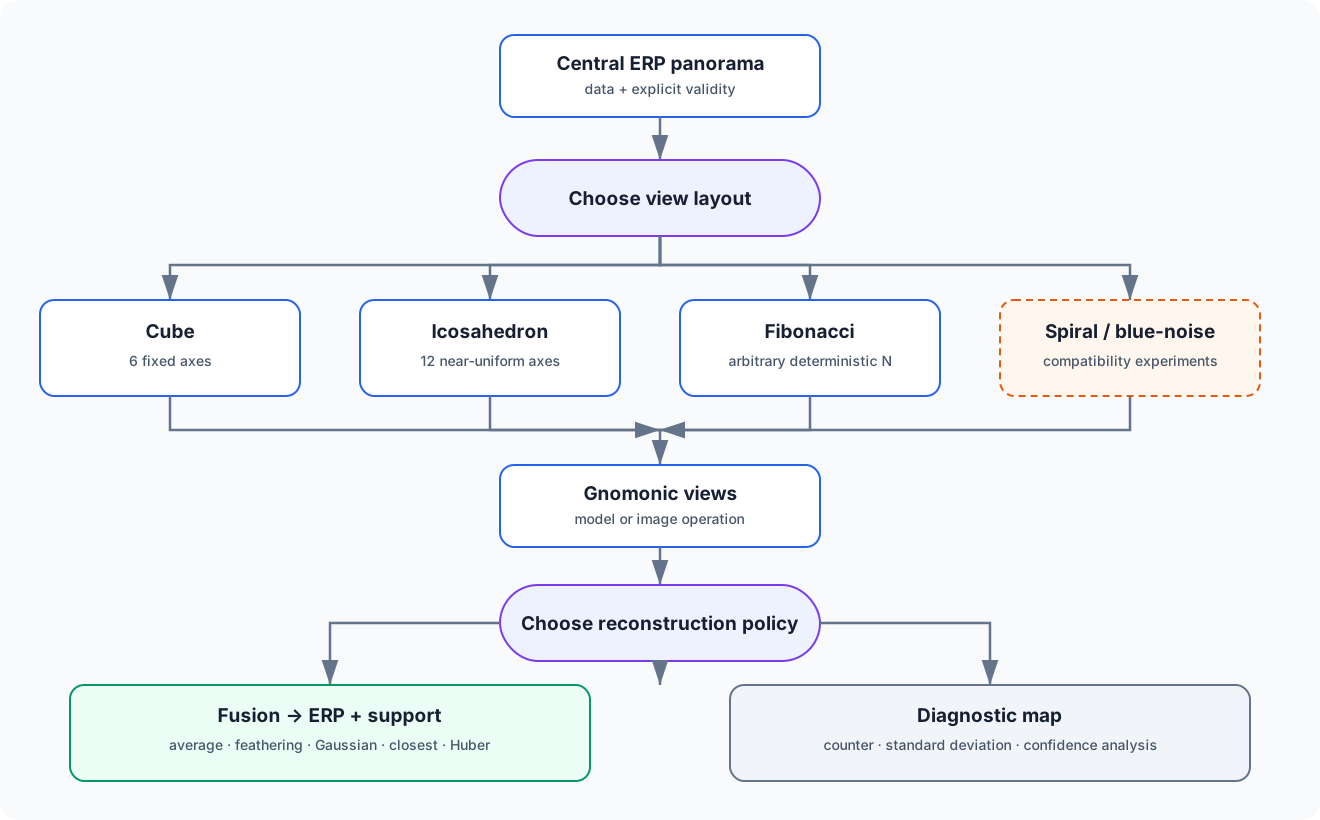
The sampler classes are Compatibility surfaces retained across 3.x. The
Stable object workflow calls them by layout name. Use cube when exactly six
faces or interoperability matters, icosahedron for a compact near-uniform
feature rig, and fibonacci when the number of views is the primary control.
spiral and stochastic blue_noise are better treated as explicit
experiments.
import panorai as pa

workflow_panorama = pa.EquirectangularImage(rgb)
faces = workflow_panorama.views("cube", size=8)
processed = faces.map(lambda image: np.clip(image, 0.0, 1.0))
reconstructed = processed.reconstruct()
shortcut = workflow_panorama.process_views(
    lambda image: np.clip(image, 0.0, 1.0),
    layout="cube",
    size=8,
)
assert len(faces) == 6
assert reconstructed.image.shape == rgb.shape
assert np.allclose(reconstructed.image, shortcut.image, equal_nan=True)
assert faces.describe()["contract"] == "geometry-v1"
Stable fusion blenders are average, gaussian, feathering, closest, and
huber. counter, std, and std_feathered produce diagnostic maps. The
spatial/no-confidence Huber variants and bundle-adjustment blender remain
Experimental. A blender always receives explicit support; black RGB and zero
labels are valid values.
from panorai.blenders import AverageBlender

black = np.zeros((4, 6, 3), dtype=np.float32)
white = np.ones((4, 6, 3), dtype=np.float32)
black_is_valid = np.ones((4, 6), dtype=bool)
white_is_invalid = np.zeros((4, 6), dtype=bool)
blended, blend_support = AverageBlender().blend(
    [black, white],
    [black_is_valid, white_is_invalid],
    return_mask=True,
)
assert np.array_equal(blended, black)  # black is data, not missingness
assert blend_support.all()
4. Interpolation follows the modality
Data |
Interpolation |
Important rule |
|---|---|---|
floating RGB or continuous field |
bilinear or nearest |
choose invalid-data policy explicitly |
radial range/depth |
bilinear with explicit validity, or nearest |
range is radial; |
labels |
nearest |
values remain exact integers |
boolean masks |
nearest |
|
support_mask answers “does this projection cover the output pixel?”
validity_mask answers “did valid data contribute?” These are independent.
With invalid_policy="renormalize", PanorAi also returns the valid bilinear
weight and requires a caller-chosen min_valid_weight.
labels = (np.arange(height * width) % 7).reshape(height, width).astype(np.int16)
label_view = equirectangular_to_gnomonic(labels, view_spec, interpolation="nearest")
assert label_view.data.dtype == np.int16

valid = np.ones((height, width), dtype=bool)
valid[:, :4] = False
mask_view = equirectangular_to_gnomonic(valid, view_spec, interpolation="nearest")
assert mask_view.data.dtype == np.bool_

radial_range_m = np.full((height, width), 2.5, dtype=np.float32)
radial_range_m[0, 0] = np.nan  # invalid data stays distinct from support
depth_is_valid = np.isfinite(radial_range_m)
depth_view = equirectangular_to_gnomonic(
    radial_range_m,
    view_spec,
    interpolation="bilinear",
    invalid_policy="renormalize",
    validity_mask=depth_is_valid,
    min_valid_weight=0.5,
)
assert depth_view.data.dtype == np.float32
assert depth_view.support_mask.all()
assert depth_view.validity_mask.shape == view_spec.output_shape_hw
assert depth_view.valid_weight.shape == view_spec.output_shape_hw
5. Where to go next
Continue to Tutorial: image processing on the sphere to convolve, denoise, equalize, detect edges, transform, and build pyramids without returning to planar ERP neighbourhoods.
Then use Tutorial: spherical features and matching to turn preprocessed virtual views into panorama-frame features and bearings.
Use Cubemap, batch, and autograd for model-over-views recipes.
Use Choose modality, layout, and interpolation for dtype, layout, invalid-data, and Torch guidance.
Treat PanorAi canonical spherical geometry as the normative mathematical specification.